
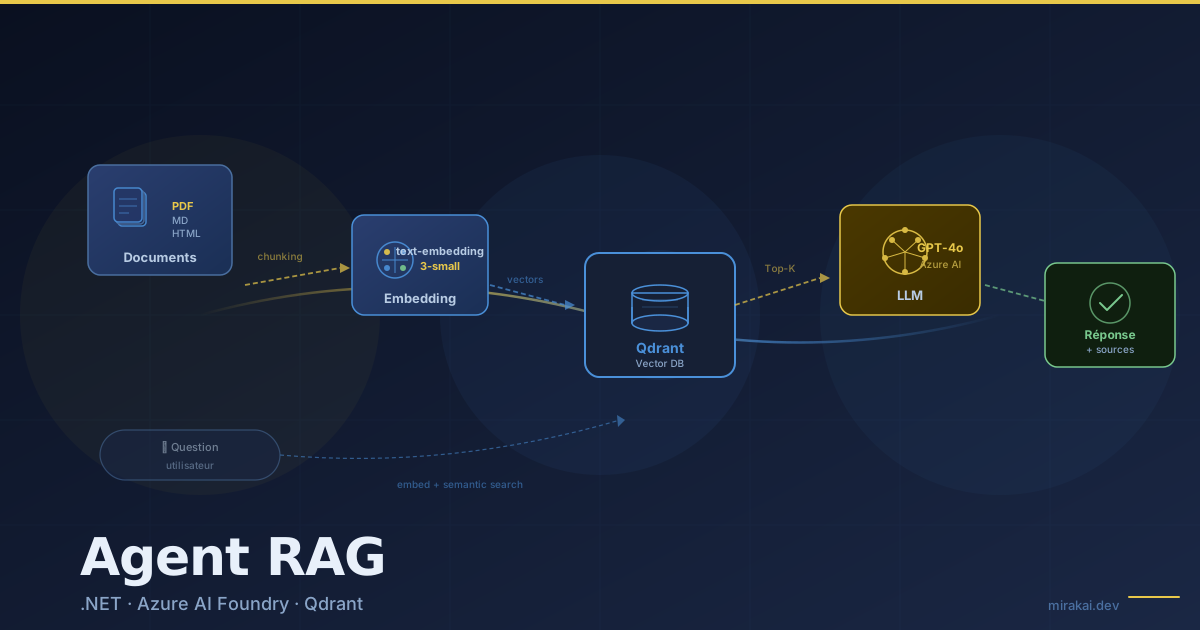
Les implémentations de RAG qu'on trouve sont souvent des prototypes Python qui ne tiennent pas en production.
Voici un pipeline RAG complet en .NET 10, avec Azure AI Foundry pour les embeddings et le LLM, et Qdrant comme base vectorielle. Le code compile, les deux classes UUID-safe et les deux pipelines sont distincts — ingestion batch d'un côté, requête temps réel de l'autre.
L'architecture cible
flowchart TB
    subgraph ING["Pipeline d'ingestion (batch)"]
        direction LR
        DOC["📄 PDF · Markdown · HTML"] --> CHK["✂️ Chunking + overlap"]
        CHK --> EMB["🔢 Embedding\ntext-embedding-3-small"]
        EMB --> QDB
    end

    QDB[("🗄️ Qdrant\nVector DB")]

    subgraph QRY["Pipeline de requête (temps réel)"]
        direction LR
        USR["💬 Question"] --> QEMB["🔢 Embedding\nrequête"]
        QEMB --> SRCH["🔍 Top-K search\nscore ≥ 0.70"]
        SRCH --> PROMPT["📝 Prompt\n+ contexte"]
        PROMPT --> LLM["🤖 GPT-4o\nAzure AI Foundry"]
        LLM --> ANS["✅ Réponse\n+ sources + score"]
    end

    QDB -->|"chunks"| SRCH

    style QDB fill:#2A3E6F,stroke:#4A90D9,color:#E8F0FA
    style LLM fill:#3A4E7F,stroke:#E8C84A,color:#E8F0FA
    style ANS fill:#1A3A20,stroke:#4A9A5A,color:#E8F0FA
Les deux pipelines sont délibérément séparés. Les confondre dans une seule classe est la première erreur à éviter.
Prérequis NuGet
<PackageReference Include="Microsoft.Extensions.AI.OpenAI" Version="9.*" />
<PackageReference Include="Azure.AI.OpenAI" Version="2.*" />
<PackageReference Include="Qdrant.Client" Version="1.*" />
<PackageReference Include="PdfPig" Version="0.1.*" />
<PackageReference Include="Microsoft.Extensions.Hosting" Version="9.*" />
Démarrage local — Qdrant en Docker
Avant de brancher Azure, lance Qdrant en local :
docker run -d -p 6333:6333 -p 6334:6334 qdrant/qdrant
L'interface web est sur http://localhost:6333/dashboard. Le port 6334 est le port gRPC utilisé par QdrantClient.
Dans appsettings.Development.json :
{
  "Qdrant": { "Host": "localhost" },
  "AzureOpenAI": { "Endpoint": "https://VOTRE-ENDPOINT.openai.azure.com/" }
}
Extraction des documents
PdfPig extrait le texte brut d'un PDF page par page. Le DocumentChunker prend du texte brut en entrée, quelle que soit la source.
// DocumentExtractor.cs
public static class DocumentExtractor
{
public static string FromPdf(string filePath)
{
using var document = PdfDocument.Open(filePath);
var sb = new StringBuilder();
foreach (var page in document.GetPages())
{
sb.AppendLine(page.Text);
sb.AppendLine();
}
return sb.ToString();
}
public static string FromMarkdown(string filePath) =>
File.ReadAllText(filePath);
public static string FromHtml(string filePath)
{
var html = File.ReadAllText(filePath);
return Regex.Replace(html, "<[^>]+>", " ")
.Replace(" ", " ")
.Replace("&", "&");
}
}
Pipeline d'ingestion
1. Extraction et chunking
// DocumentChunker.cs
public class DocumentChunker
{
    private readonly ChunkingOptions _options;

    public DocumentChunker(ChunkingOptions options) => _options = options;

    public IReadOnlyList<DocumentChunk> Chunk(string documentId, string content)
    {
        var chunks = new List<DocumentChunk>();
        var paragraphs = SplitIntoParagraphs(content);

        var current = new StringBuilder();
        int chunkIndex = 0;

        foreach (var paragraph in paragraphs)
        {
            // Fenêtre glissante avec overlap
            if (current.Length + paragraph.Length > _options.MaxChunkSize
                && current.Length > 0)
            {
                chunks.Add(CreateChunk(documentId, chunkIndex++, current.ToString()));

                // Overlap : conserve les derniers N caractères pour le contexte
                string text = current.ToString();
                current.Clear();
                current.Append(text[^Math.Min(_options.OverlapSize, text.Length)..]);
            }

            current.AppendLine(paragraph);
        }

        if (current.Length > 0)
            chunks.Add(CreateChunk(documentId, chunkIndex, current.ToString()));

        return chunks;
    }

    private static DocumentChunk CreateChunk(string docId, int index, string text) =>
        new(
            Id: $"{docId}-chunk-{index}",
            DocumentId: docId,
            Content: text.Trim(),
            Index: index
        );

    private static IEnumerable<string> SplitIntoParagraphs(string content) =>
        content.Split(["\n\n", "\r\n\r\n"], StringSplitOptions.RemoveEmptyEntries);
}

public record DocumentChunk(string Id, string DocumentId, string Content, int Index);
public record ChunkingOptions(int MaxChunkSize = 1000, int OverlapSize = 150);
2. Génération des embeddings
// EmbeddingService.cs
public class EmbeddingService
{
    private readonly IEmbeddingGenerator<string, Embedding<float>> _generator;

    public EmbeddingService(IEmbeddingGenerator<string, Embedding<float>> generator)
        => _generator = generator;

    public async Task<float[]> GenerateAsync(string text, CancellationToken ct = default)
    {
        var result = await _generator.GenerateEmbeddingAsync(text, cancellationToken: ct);
        return result.Vector.ToArray();
    }

    public async Task<IReadOnlyList<float[]>> GenerateBatchAsync(
        IReadOnlyList<string> texts,
        CancellationToken ct = default)
    {
        var results = await _generator.GenerateAsync(texts, cancellationToken: ct);
        return results.Select(r => r.Vector.ToArray()).ToList();
    }
}
3. Stockage dans Qdrant
// QdrantVectorStore.cs
public class QdrantVectorStore
{
    private readonly QdrantClient _client;
    private const string CollectionName = "documents";
    private const uint VectorSize = 1536; // text-embedding-3-small

    public QdrantVectorStore(QdrantClient client) => _client = client;

    public async Task EnsureCollectionExistsAsync(CancellationToken ct = default)
    {
        bool exists = await _client.CollectionExistsAsync(CollectionName, ct);
        if (!exists)
        {
            await _client.CreateCollectionAsync(
                CollectionName,
                new VectorParams { Size = VectorSize, Distance = Distance.Cosine },
                cancellationToken: ct);
        }
    }

    public async Task UpsertChunksAsync(
        IReadOnlyList<(DocumentChunk Chunk, float[] Embedding)> items,
        CancellationToken ct = default)
    {
        var points = items.Select(item => new PointStruct
        {
            // UUID déterministe : même chunk → même ID, idempotent à la réingestion
            Id = new PointId { Uuid = ToStableUuid(item.Chunk.Id) },
            Vectors = item.Embedding,
            Payload =
            {
                ["document_id"] = item.Chunk.DocumentId,
                ["content"]     = item.Chunk.Content,
                ["chunk_index"] = item.Chunk.Index,
                ["indexed_at"]  = DateTime.UtcNow.ToString("O")
            }
        }).ToList();

        await _client.UpsertAsync(CollectionName, points, cancellationToken: ct);
    }

    public async Task<IReadOnlyList<RetrievedChunk>> SearchAsync(
        float[] queryEmbedding,
        int topK = 5,
        float scoreThreshold = 0.70f,
        CancellationToken ct = default)
    {
        var results = await _client.SearchAsync(
            CollectionName,
            queryEmbedding,
            limit: (ulong)topK,
            scoreThreshold: scoreThreshold,
            cancellationToken: ct);

        return results.Select(r => new RetrievedChunk(
            Content: r.Payload["content"].StringValue,
            DocumentId: r.Payload["document_id"].StringValue,
            Score: r.Score
        )).ToList();
    }

    // MD5 → Guid : même input → même UUID, pas de collision pour des IDs de chunks
    private static string ToStableUuid(string input)
    {
        var hash = MD5.HashData(Encoding.UTF8.GetBytes(input));
        return new Guid(hash).ToString();
    }
}

public record RetrievedChunk(string Content, string DocumentId, float Score);
4. Pipeline d'ingestion complet
// IngestionPipeline.cs
public class IngestionPipeline
{
    private readonly DocumentChunker _chunker;
    private readonly EmbeddingService _embeddings;
    private readonly QdrantVectorStore _store;
    private readonly ILogger<IngestionPipeline> _logger;

    public IngestionPipeline(
        DocumentChunker chunker,
        EmbeddingService embeddings,
        QdrantVectorStore store,
        ILogger<IngestionPipeline> logger)
    {
        _chunker   = chunker;
        _embeddings = embeddings;
        _store     = store;
        _logger    = logger;
    }

    public async Task IngestAsync(string documentId, string content, CancellationToken ct)
    {
        _logger.LogInformation("Ingestion de {DocId}...", documentId);

        // 1. Chunking
        var chunks = _chunker.Chunk(documentId, content);
        _logger.LogInformation("{Count} chunks créés", chunks.Count);

        // 2. Embeddings en batch (plus efficace que un par un)
        var texts = chunks.Select(c => c.Content).ToList();
        var embeddings = await _embeddings.GenerateBatchAsync(texts, ct);

        // 3. Stockage
        var items = chunks.Zip(embeddings, (c, e) => (c, e)).ToList();
        await _store.UpsertChunksAsync(items, ct);

        _logger.LogInformation("Ingestion de {DocId} terminée", documentId);
    }
}
Pipeline de requête (RAG proprement dit)
// RagAgent.cs
public class RagAgent
{
    private readonly EmbeddingService _embeddings;
    private readonly QdrantVectorStore _store;
    private readonly IChatClient _llm;

    public RagAgent(
        EmbeddingService embeddings,
        QdrantVectorStore store,
        IChatClient llm)
    {
        _embeddings = embeddings;
        _store      = store;
        _llm        = llm;
    }

    public async Task<RagResponse> AnswerAsync(string question, CancellationToken ct = default)
    {
        // 1. Embedding de la question
        var queryEmbedding = await _embeddings.GenerateAsync(question, ct);

        // 2. Recherche sémantique dans Qdrant
        var chunks = await _store.SearchAsync(
            queryEmbedding,
            topK: 5,
            scoreThreshold: 0.70f,
            ct);

        if (chunks.Count == 0)
        {
            return new RagResponse(
                Answer: "Je n'ai pas trouvé d'information pertinente dans les documents disponibles.",
                Sources: [],
                ConfidenceScore: 0f);
        }

        // 3. Construction du prompt avec le contexte récupéré
        string context = BuildContext(chunks);
        string systemPrompt = """
            Tu es un assistant qui répond à des questions en te basant exclusivement
            sur les extraits de documents fournis.

            RÈGLES ABSOLUES :
            - Réponds uniquement avec les informations présentes dans le CONTEXTE
            - Si l'information n'est pas dans le contexte, dis-le explicitement
            - Cite les passages pertinents entre guillemets quand c'est utile
            - Ne complète jamais avec des informations générales
            """;

        var messages = new List<ChatMessage>
        {
            new(ChatRole.System, systemPrompt),
            new(ChatRole.User, $"CONTEXTE :\n{context}\n\nQUESTION : {question}")
        };

        // 4. Génération de la réponse
        var response = await _llm.CompleteAsync(messages, cancellationToken: ct);

        // 5. Score de confiance basé sur la similarité moyenne des chunks
        float avgScore = chunks.Average(c => c.Score);

        return new RagResponse(
            Answer: response.Message.Text ?? string.Empty,
            Sources: chunks.Select(c => c.DocumentId).Distinct().ToList(),
            ConfidenceScore: avgScore);
    }

    private static string BuildContext(IReadOnlyList<RetrievedChunk> chunks)
    {
        var sb = new StringBuilder();
        for (int i = 0; i < chunks.Count; i++)
        {
            sb.AppendLine($"[Extrait {i + 1} — Source: {chunks[i].DocumentId}]");
            sb.AppendLine(chunks[i].Content);
            sb.AppendLine();
        }
        return sb.ToString();
    }
}

public record RagResponse(
    string Answer,
    IReadOnlyList<string> Sources,
    float ConfidenceScore);
Configuration et injection de dépendances
// Program.cs
var builder = Host.CreateApplicationBuilder(args);

// Azure AI Foundry — Embeddings
builder.Services.AddEmbeddingGenerator<string, Embedding<float>>(sp =>
{
    var client = new AzureOpenAIClient(
        new Uri(builder.Configuration["AzureOpenAI:Endpoint"]!),
        new DefaultAzureCredential());
    return client.AsEmbeddingGenerator("text-embedding-3-small");
});

// Azure AI Foundry — Chat
builder.Services.AddChatClient(sp =>
{
    var client = new AzureOpenAIClient(
        new Uri(builder.Configuration["AzureOpenAI:Endpoint"]!),
        new DefaultAzureCredential());
    return client.AsChatClient("gpt-4o");
});

// Qdrant
builder.Services.AddSingleton(sp =>
    new QdrantClient(builder.Configuration["Qdrant:Host"]!, 6334));

// Pipeline
builder.Services.AddSingleton(new ChunkingOptions(MaxChunkSize: 1000, OverlapSize: 150));
builder.Services.AddSingleton<DocumentChunker>();
builder.Services.AddSingleton<EmbeddingService>();
builder.Services.AddSingleton<QdrantVectorStore>();
builder.Services.AddSingleton<IngestionPipeline>();
builder.Services.AddSingleton<RagAgent>();

var app = builder.Build();

// Initialisation de la collection Qdrant
var store = app.Services.GetRequiredService<QdrantVectorStore>();
await store.EnsureCollectionExistsAsync();
Utilisation
// Ingérer un document PDF
var pipeline = app.Services.GetRequiredService<IngestionPipeline>();
var text = DocumentExtractor.FromPdf("contrats/durand-sa.pdf");
await pipeline.IngestAsync("durand-sa", text, CancellationToken.None);

// Interroger
var agent = app.Services.GetRequiredService<RagAgent>();
var response = await agent.AnswerAsync("Quelles sont les clauses de résiliation ?");

Console.WriteLine(response.Answer);
Console.WriteLine($"Sources  : {string.Join(", ", response.Sources)}");
Console.WriteLine($"Confiance: {response.ConfidenceScore:P0}");
Ce qui manque dans la plupart des implémentations
Reranking avec Cohere. Les top-K résultats de Qdrant sont ordonnés par similarité vectorielle (cosinus entre embeddings) — efficace mais approximatif. Un reranker cross-encoder relit la paire (question, chunk) ensemble pour calculer une pertinence contextuelle réelle, bien plus précise pour les questions complexes.
L'API Cohere Rerank retourne un score de pertinence contextuelle fin pour chaque passage — sans fine-tuning ni modèle hébergé.
// http : HttpClient injecté, cohereApiKey : string depuis IConfiguration
var payload = new
{
    model     = "rerank-v3.5",
    query     = question,
    documents = chunks.Select(c => c.Content).ToArray(),
    top_n     = chunks.Count
};

using var req = new HttpRequestMessage(HttpMethod.Post,
    "https://api.cohere.com/v2/rerank");
req.Headers.Authorization =
    new AuthenticationHeaderValue("Bearer", cohereApiKey);
req.Content = JsonContent.Create(payload);

var res  = await http.SendAsync(req, ct);
var body = await res.Content.ReadFromJsonAsync<JsonElement>(ct);

// Réordonne les chunks par pertinence Cohere avant de les injecter dans le prompt
chunks = body.GetProperty("results")
    .EnumerateArray()
    .OrderByDescending(r => r.GetProperty("relevance_score").GetSingle())
    .Select(r => chunks[r.GetProperty("index").GetInt32()])
    .ToList();
Gestion du contexte trop long. Si vos 5 chunks font ensemble 6 000 tokens et votre question 200 tokens, vous êtes à 6 200 tokens de contexte. Pour GPT-4o, ça passe. Pour un modèle local avec une fenêtre de 4 096 tokens, ça plante. Calculez la longueur du contexte avant le call LLM.
Cache des embeddings. Recalculer l'embedding de la même question à chaque fois est un gaspillage. Un cache Redis avec TTL d'une heure sur les embeddings de requête divise les coûts API par 3 à 5 sur un système en production.
Évaluation continue avec RAGAS. Savoir que votre RAG "répond" ne suffit pas en production. RAGAS (RAG Assessment) est un framework open-source Python qui évalue votre pipeline de façon automatisée sur quatre métriques :
| Métrique | Ce qu'elle mesure |
|---|---|
| Faithfulness | La réponse utilise-t-elle uniquement les infos du contexte ? (détection d'hallucination) |
| Answer Relevance | La réponse répond-elle réellement à la question posée ? |
| Context Precision | Les chunks récupérés sont-ils pertinents à la question ? |
| Context Recall | Tous les documents utiles ont-ils bien été retrouvés ? |
RAGAS génère des questions synthétiques à partir de vos documents, exécute votre pipeline, et retourne un score 0–1 par métrique. Intégré dans votre CI, il détecte les régressions dès qu'un changement de prompt, de chunk size, ou de score threshold dégrade la qualité.
Olivier Alessandri — Architecte IA & .NET · Mirakai Agents autonomes · Azure AI Foundry · Microsoft Orleans · Architecture multi-agents